通常在管理Server的時候,也可以使用一些指令搭配的方式,將所得到的資訊,mail給管理者,方便管理者只需要使用mail就可以查看目前的Server的狀態
sudo df -h | mail -s 'Server HD Space' abc@ccc.com.tw
這樣就可以寄到管理者上囉,當然你也可以把他加入排程
sudo crontab -e

蒼穹 發表在 痞客邦 留言(0) 人氣()

安裝好PostFit後,沒有報表分析怎行呢?找了支援PostFix之源的分析軟體,採用awstats分析
1.sudo apt-get install awstats
修改設定檔案,請參考以下的網址
http://awstats.sourceforge.net/docs/awstats_faq.html#MAIL

蒼穹 發表在 痞客邦 留言(0) 人氣()

cacti01.JPG
預監控Server的狀態如CPU、磁碟空間、網路流量時,可以安裝Cacti套件與Snmpd的套件來監控網路流量。
請在安裝Ubuntu的時候,將LMAP的選項打勾,會裝Apache2+Mysql
1.sudo apt-get install cacti
  點選OK

蒼穹 發表在 痞客邦 留言(0) 人氣()

1.修改 sudo /vim /etc/postfix/mail.cf ,加入以下這段
smtpd_client_restrictions =
                 permit_mynetworks,
                permit_sasl_authenticated,
                reject_unknown_client,
                check_client_access hash:/etc/postfix/access,
                reject_rbl_client cbl.abuseat.org,
                reject_rbl_client sbl.spamhaus.org,
                reject_rbl_client xbl.spamhaus.org,
                reject_rbl_client dsbl.dnsbl.net.au

蒼穹 發表在 痞客邦 留言(0) 人氣()

1.sudo apt-get install postgrey
2.安裝完成後,查看Log檔,的postgrey是使用哪個port號,以下紅色的字體,使用10023
Nov 11 07:42:06 ubuntu postgrey[994]: Process Backgrounded
Nov 11 07:42:06 ubuntu postgrey[994]: 2010/11/11-07:42:06 postgrey (type Net::Server::Multiplex) starting! pid(994)
Nov 11 07:42:06 ubuntu postgrey[994]: Binding to TCP port 10023 on host localhost#012
Nov 11 07:42:06 ubuntu postgrey[994]: Setting gid to "116 116"
Nov 11 07:42:06 ubuntu postgrey[994]: Setting uid to "107"

蒼穹 發表在 痞客邦 留言(0) 人氣()

簡單而語,您只需要以系統管理員身份 (使用者 root) 身份執行程式 pppoeconf,照著畫面的問題去回得就可以了
 
sudo pppoeconf

蒼穹 發表在 痞客邦 留言(0) 人氣()

提供下列網址,供各位找尋所需要的硬體設備與PC
1.清單列出目前有經過Ubuntu認證過的品牌PC與NB還有Server(資料更新度比較快),我喜歡用這個網頁來購買主機,雖然價格貴了點,但安裝起來比較不會麻煩。
http://webapps.ubuntu.com/certification/
2.列出目前有資源的PC零主件,如主機板、音效卡...等等(這裡的資料通常都比較慢更新)

蒼穹 發表在 痞客邦 留言(0) 人氣()

預設的Windows遠端桌面port號為3389b,若要變更port請照下面方法變更

啟動「登錄編輯程式」。
找出並按一下下列登錄子機碼:
HKEY_LOCAL_MACHINE\System\CurrentControlSet\Control\TerminalServer\WinStations\RDP-Tcp\PortNumber

蒼穹 發表在 痞客邦 留言(1) 人氣()

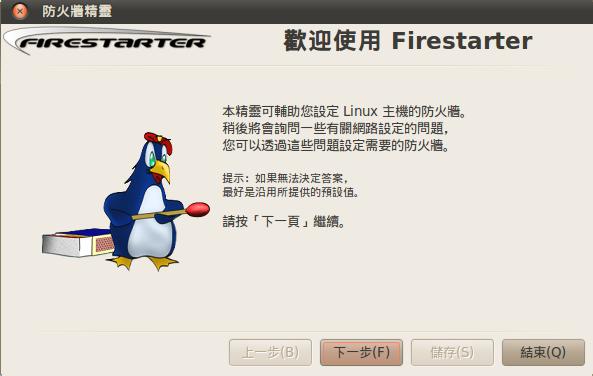
Ubuntu002.JPG
1.安裝防火牆(Firestarter)有圖形介面的防火牆,設定簡單與快速
$sudo apt-get update
$sudo apt-get install Firestarter
2.開啟圖形介面防火牆設定
[系統]->[管理]->[Firestarter]->精靈設定模式:直接點NEXT
 

蒼穹 發表在 痞客邦 留言(0) 人氣()

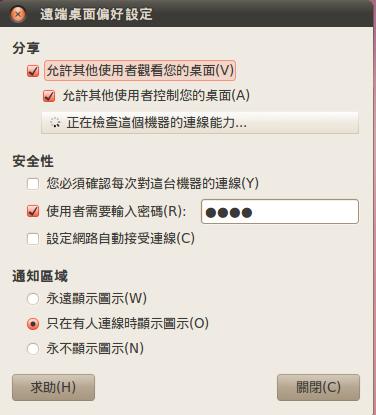
Ubuntu001.JPG
1.[系統]->[偏好設定]->[遠端桌面]


2.勾選[允許其他使用者觀看你的桌面]
   勾選[允許其他使用者控制你的桌面]
   取消勾選[你必須確認每次對這台電腦機器的連線]
   勾選[使用者需要輸入密碼[XXXXXXXX]] ----> 輸入要連線的密碼ㄛ

蒼穹 發表在 痞客邦 留言(0) 人氣()

安裝 X 窗口系統
sudo apt-get -y install x-window-system-core
安裝登錄管理器
sudo apt-get -y install gdm
安裝桌面環境
sudo apt-get -y --force-yes install ubuntu-desktop

蒼穹 發表在 痞客邦 留言(0) 人氣()

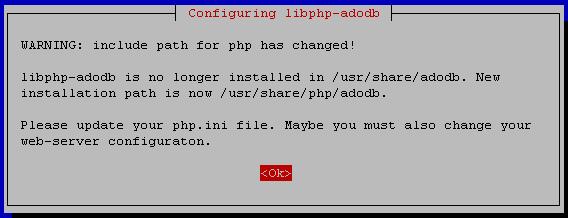
安裝openwebmail的錯誤訊息
Can't locate Crypt/Eksblowfish/Bcrypt.pm in @INC (@INC contains: /etc/perl /usr/local/lib/perl/5.8.4 /usr/local/share/perl/5.8.4 /usr/lib/perl5 /usr/share/perl5 /usr/lib/perl/5.8 /usr/share/perl/5.8 /usr/local/lib/site_perl /usr/lib/cgi-bin/openwebmail) at /usr/lib/cgi-bin/openwebmail/auth/auth_unix.pl line 15.
BEGIN failed--compilation aborted at /usr/lib/cgi-bin/openwebmail/auth/auth_unix.pl line 15.
For help, please send mail to the webmaster (webmaster@xxx.com.tw), giving this error message and the time and date of the error.
Software error:
[Tue Jul 15 17:27:36 2008] openwebmail.pl: Can't locate Crypt/Eksblowfish/Bcrypt.pm in @INC (@INC contains: /etc/perl /usr/local/lib/perl/5.8.4 /usr/local/share/perl/5.8.4 /usr/lib/perl5 /usr/share/perl5 /usr/lib/perl/5.8 /usr/share/perl/5.8 /usr/local/lib/site_perl /usr/lib/cgi-bin/openwebmail) at /usr/lib/cgi-bin/openwebmail/auth/auth_unix.pl line 15.
[Tue Jul 15 17:27:36 2008] openwebmail.pl: BEGIN failed--compilation aborted at /usr/lib/cgi-bin/openwebmail/auth/auth_unix.pl line 15.
Compilation failed in require at /usr/lib/cgi-bin/openwebmail/modules/tool.pl line 90.
蒼穹 發表在 痞客邦 留言(0) 人氣()

Blog Stats
⚠️

成人內容提醒

本部落格內容僅限年滿十八歲者瀏覽。
若您未滿十八歲,請立即離開。

已滿十八歲者,亦請勿將內容提供給未成年人士。